
Integrations
Purpose
Section titled “Purpose”Connect the installation to the external systems you use: mail server, payment, Wix and LV-Forening.
Before you start
Section titled “Before you start”- You have the permission
app_settings.manage(administrators have it). - Have the keys from the provider ready. Secret keys are stored encrypted and are never shown again — only the last four characters. Do not put them in e-mails or chat; enter them directly on the page.
- The integrations section is in Danish only for now; the Danish labels are given in brackets.
How it works
Section titled “How it works”The integrations are at the bottom of System → Modules under Integrations (Integrationer). Each integration has a switch (on/off), the key fields and the button Test connection (Afprøv forbindelse). The badge Missing key (Mangler nøgle) disappears when the required fields (marked with *) are filled in, and the integration is Ready (Klar).
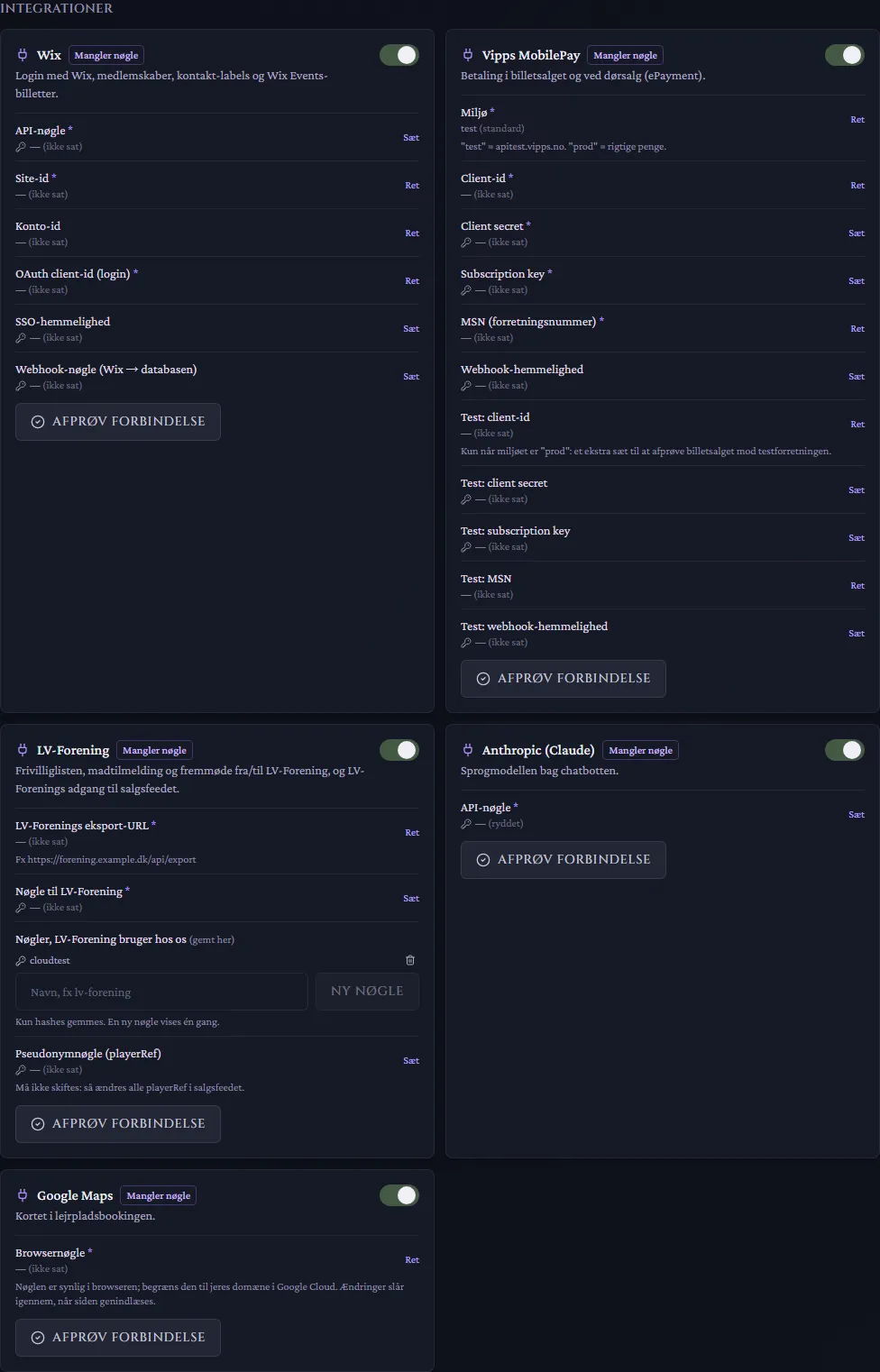
Choose Set (Sæt) next to a secret field and Edit (Ret) next to an ordinary one. Save, and choose Test connection.
E-mail (SMTP)
Section titled “E-mail (SMTP)”The system sends e-mails: confirmations, invitations, ticket e-mails and reminders. The mail server (host, port, user name and password) is set by us in the installation’s configuration, because we host it — send us the details from your mail provider (for example Google Workspace, Microsoft 365 or your web host; often an app password) in a secure way that we agree on.
You choose the sender name and address yourselves under The organisation → Sender. The address must be one your mail server may send from. Test with Send test e-mail on the E-mails tab.
Vipps MobilePay
Section titled “Vipps MobilePay”Payment in ticket sales and at door sales (ePayment). The money goes directly to your own agreement with Vipps MobilePay.
- Make an ePayment agreement with Vipps MobilePay and get the keys in their portal.
- Fill in Client id, Client secret, Subscription key and MSN (merchant serial number).
- Leave Environment (Miljø) on test and try a purchase against the test merchant. Switch to prod when everything works — prod means real money.
- The Test fields are only used when the environment is prod: an extra set for testing ticket sales against the test merchant without turning prod off.
Optional. Only for associations whose website, memberships or tickets live in Wix: login with Wix, memberships, contact labels and Wix Events tickets. Requires API key, Site id and OAuth client id. If you do not have Wix, leave it off and use E-mail login and Own tickets.
LV-Forening
Section titled “LV-Forening”Only for associations that use LV-Forening (today Legendernes Verden). The integration provides the volunteer list, meal sign-up and attendance, the member register and LV-Forening’s access to the sales feed (see LV-Database and LV-Forening).
- LV-Forening’s export URL and Key for LV-Forening: where and how LV-Database fetches from LV-Forening.
- Keys LV-Forening uses with us: keys LV-Forening uses to fetch the sales feed. Only a hash is stored; a new key is shown once.
- Pseudonym key (playerRef): must never be changed once it is set. Otherwise all buyers’ pseudonyms in the sales feed change, and the link to LV-Forening is lost.
Anthropic (Claude)
Section titled “Anthropic (Claude)”The language model behind the Chatbot module. Requires an API key from Anthropic; usage is paid to Anthropic.
Google Maps
Section titled “Google Maps”The map in Campsite booking. Requires a browser key from Google Cloud. The key is visible in the browser, so restrict it to your domain in Google Cloud.
Common mistakes
Section titled “Common mistakes”- “Test connection” fails. A key is mistyped or copied with spaces, or the key belongs to another environment (test/prod).
- E-mails do not arrive. The sender address is not allowed by the mail provider, or the mail server password has changed. Contact us with the new one.
- Modules cannot be turned on. Ticket sales requires Vipps MobilePay and Wix; Campsite booking requires Google Maps; Chatbot requires Anthropic.