Templates
Purpose
Section titled “Purpose”Give the installation a ready-made game world to start from — or move your own game world to another installation.
A template is one zip file with the game-world modules (on/off), settings, terms, counters, custom fields and all rules (races, abilities, professions …). It never contains players, characters or other personal data.
Before you start
Section titled “Before you start”- Only an administrator can use the page (permission
templates.manage). - Load the template before the organisers start creating abilities and characters — then you have the least to change afterwards.
The bundled templates
Section titled “The bundled templates”| Template | For | Contents |
|---|---|---|
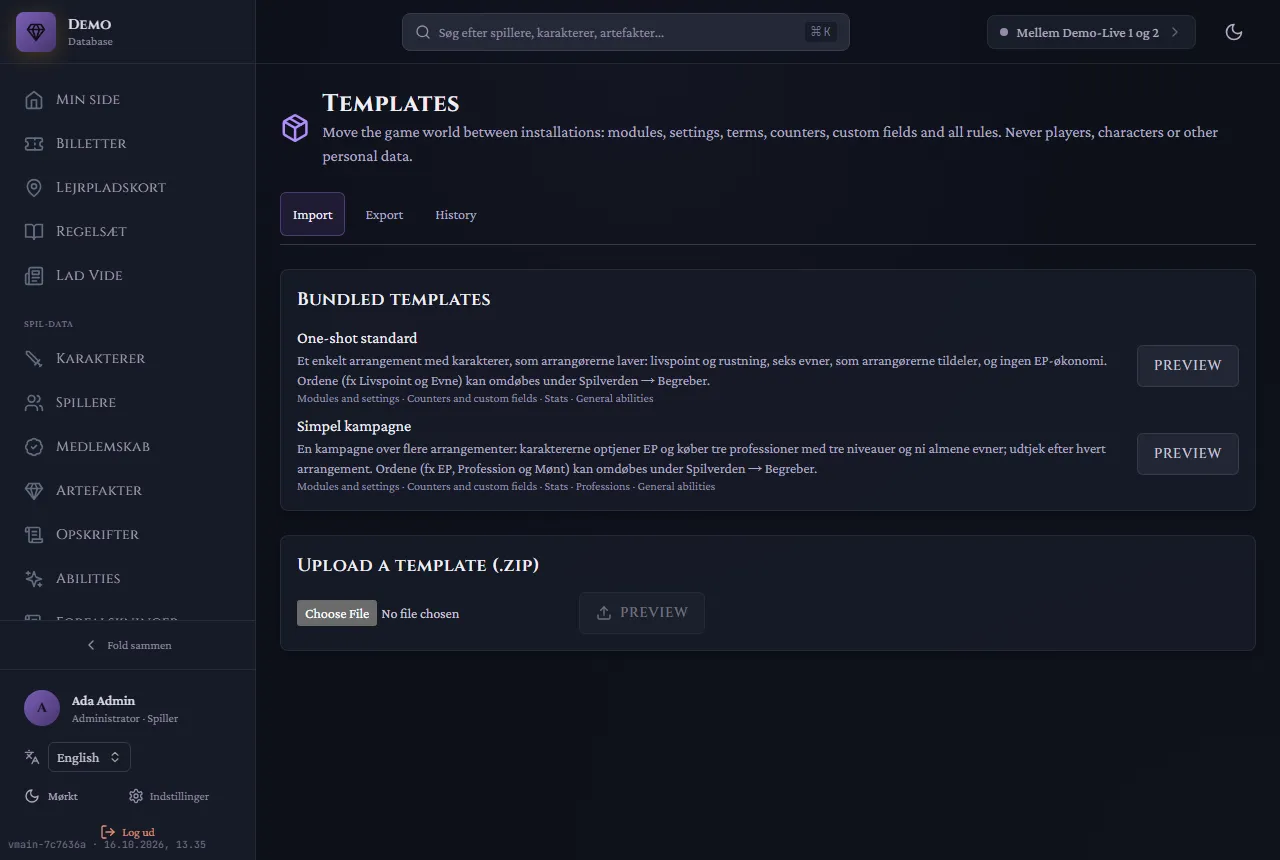
| One-shot standard | A single event | Characters made by the organisers: life points and armour, six abilities that the organisers assign, no EP economy |
| Simple campaign (Simpel kampagne) | A campaign over several events | EP, three professions with three levels, nine general abilities and check-out after each event |
Both are genre-neutral. The words (for example Life points, Ability, EP, Profession, Coin) are changed afterwards under Game world → Terms (Spilverden → Begreber).
Load a template
Section titled “Load a template”- Go to Game world → Templates (Spilverden → Skabeloner), tab Import.
- Choose Preview next to a bundled template — or upload a zip under Upload a template.
- The preview shows what is added, changed and archived. Choose:
- Add and update: adds and changes what the template mentions; everything else stays.
- Replace: makes the game world match the template; whatever the template does not have is archived.
- Choose Import. With Replace you type the template’s name to confirm. The import runs as one: either all of it succeeds, or nothing changes.
Content is archived, never deleted.
Export your game world
Section titled “Export your game world”- Tab Export: choose the areas, and whether files (images, PDFs) are included.
- Download the zip file. It can be loaded on another installation.
The History tab shows earlier exports and imports.
Common mistakes
Section titled “Common mistakes”- “Replace” removed something we used. It is archived, not deleted. Load your own export again, or bring it back from the archive.
- The zip file is rejected. It is too large (by default at most 100 MB), not made by LV-Database, or made on a newer version of LV-Database than your installation runs.
- “Fix the blocking warnings”. The preview found something that must be fixed first; the warnings say what.
- “The preview is out of date”. Someone changed the game world in the meantime. Choose Preview again.
- The words do not fit your game. Change them under Terms; the template’s words are only a starting point.
Related pages
Section titled “Related pages”- Modules (the game-world modules)
- The organisation
- Glossary: Template, Game world, Terms